Two years ago, "a teleprompter that lives in the MacBook notch and stays invisible on screen shares" was one app. In 2026 it's at least a dozen. Avocado, CueNotch, Moody, Mootch, Notchie, NotchPrompter, Textream and VoicePrompter all park your script near the lens, all disappear from Zoom and OBS, and most scroll when you speak. Around them sits an older category — PromptSmart, Teleprompter Pro, Virtual Teleprompter — plus browser tools and all-in-one recorders that solve an adjacent problem.
Every price below was checked against the vendor's own pricing page or App Store listing in July 2026, not against other comparison articles. That matters more than it should: while researching this we found a widely-cited roundup listing PromptSmart Pro at $9.99/month and $99.99/year when the App Store listing says $29.99 once plus an optional $34.99/year. Treat any teleprompter comparison that doesn't say where its numbers came from as something to spot-check before you buy.
Short answer: Avocado. Notch placement, capture invisibility and voice scrolling are table stakes now, so the questions that actually separate these apps are whether your AI assistant can reach your scripts, whether you want the app open above your face for an hour, whether it reaches past your own screen, whether it tells you anything about how you delivered, and what you get without paying. Avocado is the only app here with a good answer to all five. It's the only teleprompter in this roundup that lets Claude, Cursor or Codex write straight into your script library. It's the only native Mac app that drives five synchronised prompter displays and lets an operator talk back to the presenter mid-take. It keeps run-over-run rehearsal history, it has the most generous free tier in the roundup, it ships on the Mac App Store, and version 3.0 brought Liquid Glass across the prompter, toolbar and editor, so it looks like part of macOS rather than something parked on top of it. The other eighteen are below, with what each one does and where each one stops.
What every notch prompter does now
Worth being blunt about, because most comparisons still treat these as selling points:
- Notch placement. All of them. Your script sits above the lens so your eyes read as eye contact.
- Screen-share invisibility. All of them. macOS has a built-in way for an app to keep a window out of screen recordings and shares, and every app here uses it. You see your script; Zoom doesn't.
- Voice-activated scrolling. All of them, using Apple's on-device speech recognition.
If a comparison tells you one of these is unique to any app, it was written before this year.
So what actually separates them in 2026
- Whether your AI assistant can reach it. Almost everyone drafts scripts with an assistant now and then pastes the result somewhere else. One app on this list removes the paste.
- Whether you want to look at it. You have this thing open above your face for an hour at a time. Whether it reads as part of macOS or as a black box parked on your screen is not a small thing, and it's the one quality no table can score.
- Whether it scales past one screen. Nearly every option assumes one person reading off one Mac. Multi-device prompting and remote control are where the field thins out fast.
- Whether it helps you improve. Scrolling text is solved. Telling you your pace drifted in the third paragraph is not.
- How much it does when you aren't reading. Script organisation, imports, markers, tags — the unglamorous parts you touch every single session, and the column below where most of this field is simply blank.
- What you get without paying. This has shifted a lot in a year. Four apps here are entirely free, several more have a real free tier, and the remaining $29-ish apps now look expensive rather than standard.
Avocado — the only teleprompter your AI assistant can write into
Everyone drafts scripts with an AI now. Almost nobody reads them there. The script gets written in one window, copied, and pasted into whatever is going to scroll it past the lens — and every revision after that means going back, asking again, copying again, and losing whatever markers you had already placed.
Avocado runs a local MCP server, so Claude, Claude Code, Cursor or Codex can reach your script library directly. Ask for a tighter opening and it changes in the sidebar. Ask for a sixty-second cut for Instagram and a new script appears, titled and tagged. Ask which of your scripts mention the pricing change and it reads the library and tells you. Nothing is imported or exported — it's the same script you were going to read, edited where it lives.
The part that turns out to matter most is pace. Ask any model for "a three-minute script" and you get about 450 words, because every model reaches for 150 words per minute — an average of a population you are not part of. If you actually speak at 168, those 450 words run 2:41, and every script you have ever asked for has been twelve percent short in the same direction. Avocado has been measuring your real number every time you read, and you can share that session history with the agent so it sizes scripts against your pace instead of the average one. Once it can see your runs, "that take went twenty seconds over, cut forty words from the middle" becomes a thing you can just ask for.
No other app in this roundup offers anything comparable — it's the one column in the table below with a single check in it. It's a Pro feature, it lives behind a switch in Settings → AI Agents, and turning the switch off ends the connection the same second. How it works →
And it looks like a Mac app
This is the thing you notice within ten seconds, and no feature table captures it. Avocado is native SwiftUI, built to sit on macOS rather than beside it — and version 3.0 took that further, bringing Liquid Glass across the prompter, toolbar and editor so the app matches the system it runs on.
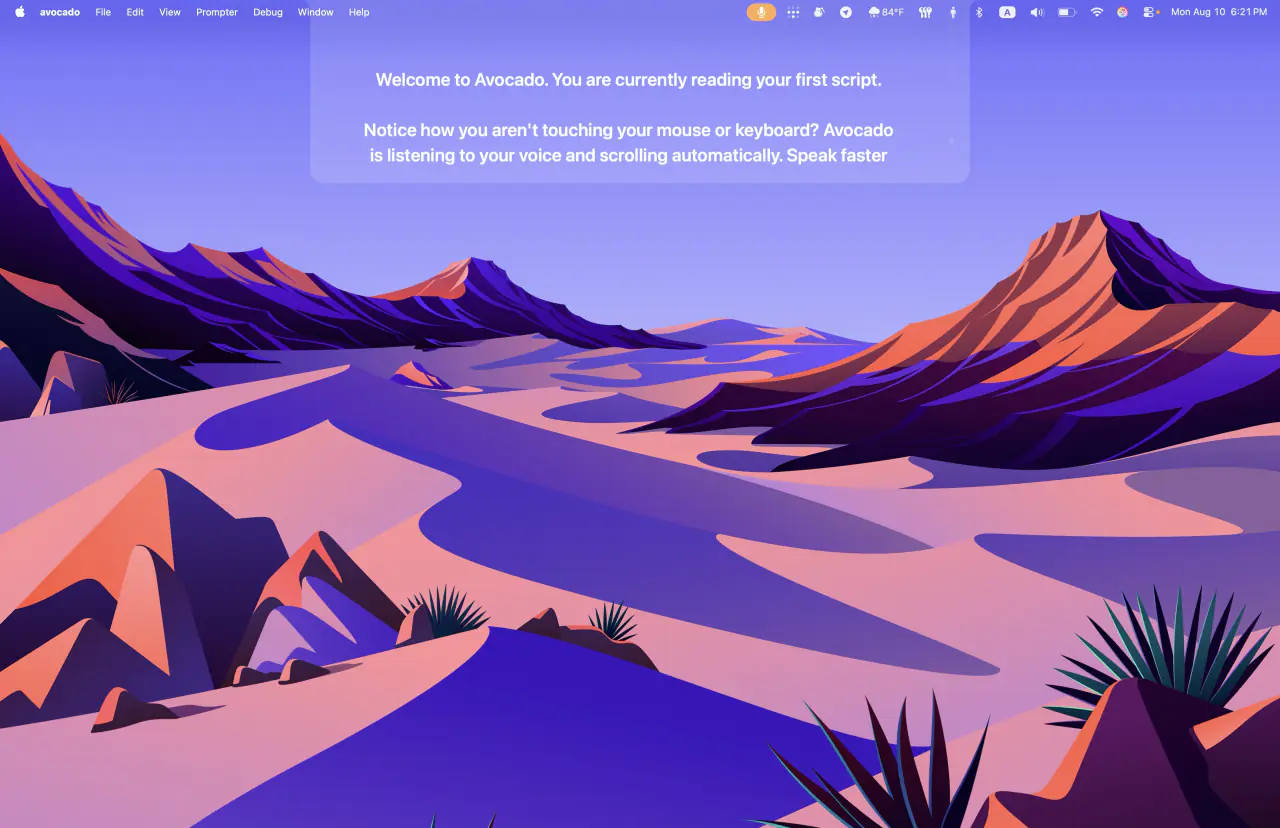
The notch panel is drawn to the real geometry of the MacBook Pro cutout — bent corners and all — so it reads as part of the hardware instead of a black rectangle parked near it. The prompter can go see-through, sitting over your wallpaper rather than blocking it, and you can set the background tint and text colour to whatever you can actually read against.
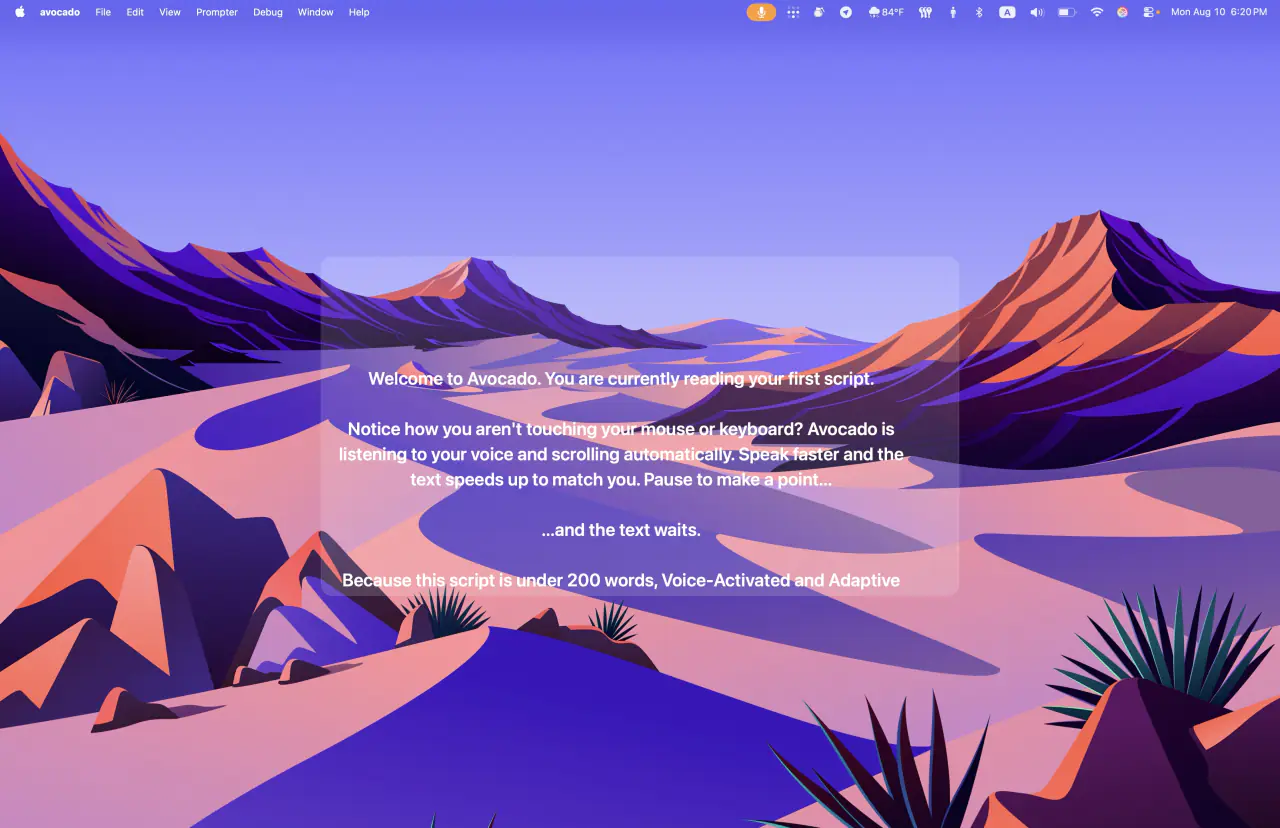
Typography is sized for reading at arm's length from a lens, not for fitting the most words on screen. That sounds like a detail until you are reading — it is the difference between glancing and squinting, and squinting is visible on camera. The same restraint runs through the heads-up display: your live words-per-minute, elapsed time and time remaining sit in one small strip you can read without breaking eye contact, rather than a dashboard competing with your script. And since 3.0, Pro lets you set the prompter in any font installed on your Mac and tune the line spacing to match.
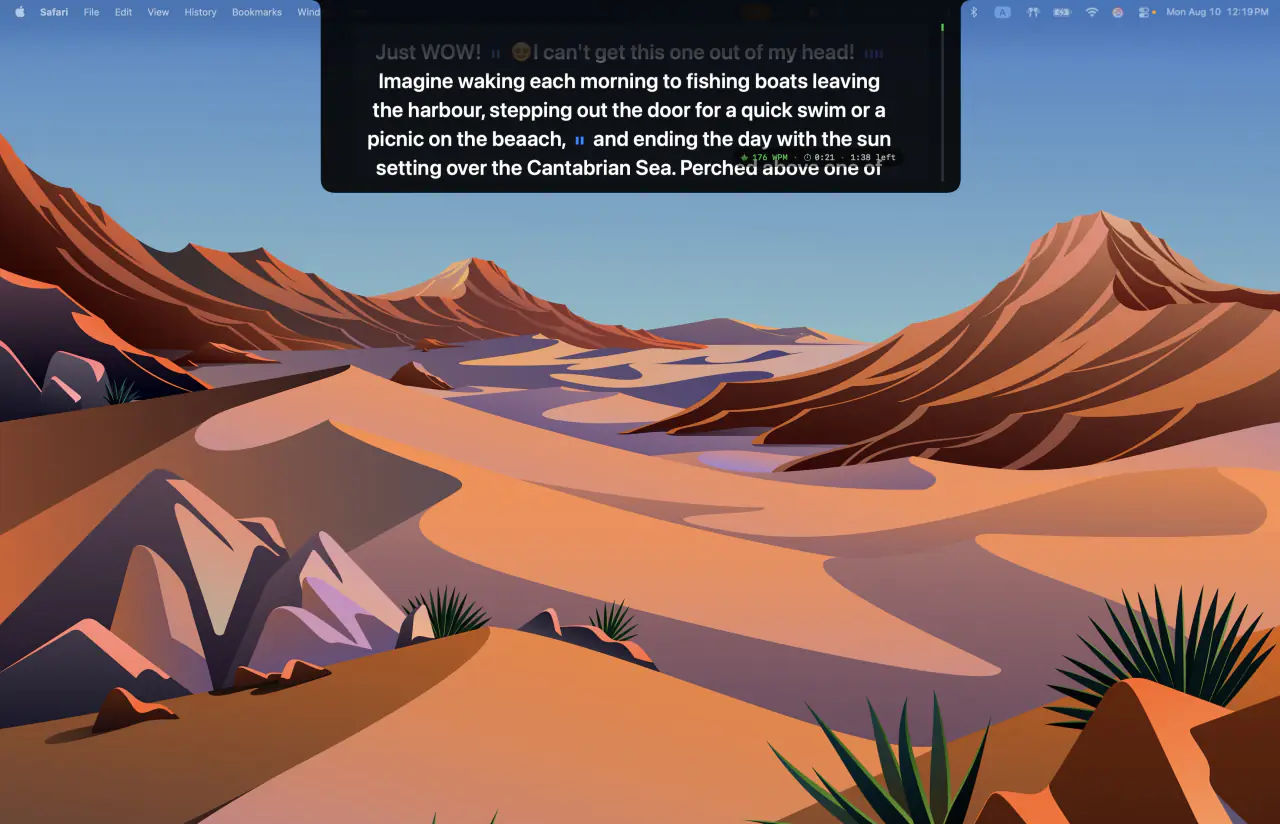
None of that shows up in a comparison table, and all of it decides whether you keep the app open or quietly stop opening it — the details that decide whether you sound like you wrote it or like you're reading it. The images on this page are the fairest test there is.
And it reaches furthest past your own screen
Where Avocado does separate is past the point of one person reading off one laptop. Director Mode hands the prompter to a producer or co-host, who can play, pause, scrub and jump markers from their own phone over local Wi-Fi, and message the presenter mid-take. The Teleprompter Viewer casts the same script to up to five devices at once — phone, tablet, Windows machine, or a hardware rig through a plain browser — all in sync, all driven by your Mac's microphone.
A couple of the free apps offer a phone remote or a basic director mode. None of them drives several synchronised prompter displays at once from one microphone, which is exactly the case Avocado is built for: a producer, a co-host and a rig, all reading from the same script at the same instant.
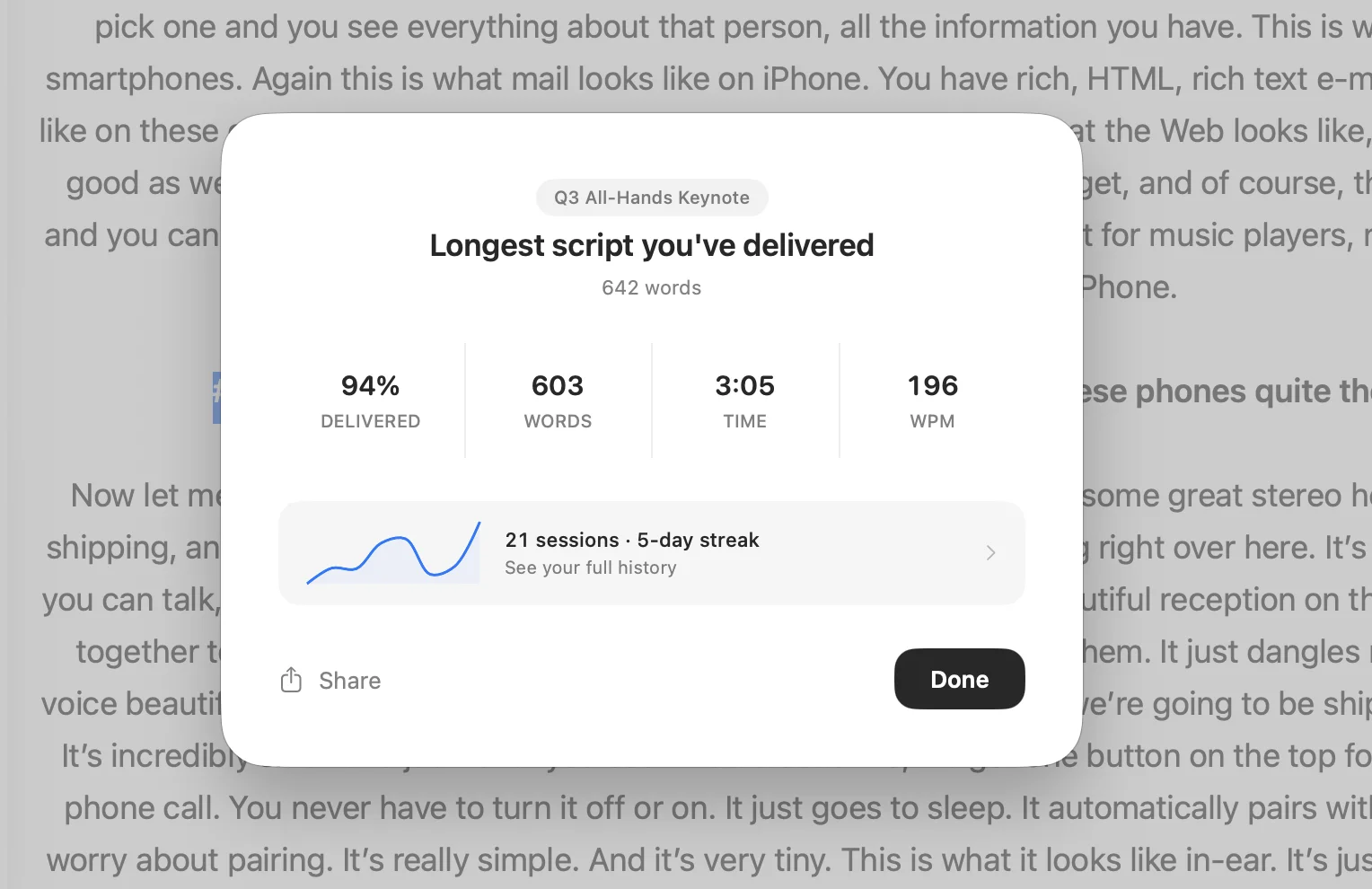
It also keeps score. Every session ends with a receipt — pace, completion, where you sped up or stalled — and running the same script again shows the difference run over run. Smart Cues mark the pacing before you start, Delivery Coaching breaks the take down afterwards on-device, and a recap lands every Monday. A couple of rivals offer a lighter pass at rehearsal feedback. None keeps per-script, run-over-run history, so none can tell you whether today's take beat Tuesday's — and on macOS 26, Avocado adds filler-word and pause analysis on top.
And the most generous free tier in the roundup
All of that sits on top of a free tier nothing else here matches: unlimited constant-speed scrolling at whatever words-per-minute you set, notch and floating modes, screen-share invisibility, the Focus Guide, Script Markers, tags and search, PowerPoint import, mirror text, session receipts, and hotkey pause so you can stop the script mid-sentence without touching the trackpad. No card, no account, no expiry, no watermark. Voice-activated scrolling is Pro, and the free tier includes three full-Pro sessions every week to use it on a real take.
No other app in this roundup hands you a searchable script library with tags, PowerPoint import, Script Markers, mirror text, both display modes and session receipts for nothing. The free apps stop at the prompter itself — here's how every free option compares — and the paid apps with a free tier hold back more of it. And because it's a free tier inside a bigger app rather than a small app with nothing to grow into, the day you need voice scrolling on every take, a second operator or five synchronised displays, you switch it on instead of starting over somewhere else.
It's also on the Mac App Store, alongside a direct download from this site — the free tier is the same either way. That matters more than it sounds if your Mac is managed by an employer or a school, where a downloaded .dmg tends to need an IT ticket and an App Store install doesn't. Several apps in this roundup are direct-download only.
What it deliberately doesn't do. Avocado doesn't record, because staying invisible is what lets it sit alongside QuickTime, ScreenFlow, OBS or Final Cut instead of making you switch recorders. And Pro is a subscription rather than a one-time purchase because the app keeps moving: 3.0 shipped in September 2026, and the public changelog shows updates most weeks. More on that in the pricing question below.
So when is a free prompter not enough?
Sooner than most people expect — and the line falls in a fairly predictable place.
A free prompter assumes the simple case: one person, one script, one Mac, one take. That holds right up until it doesn't — and the moments it stops holding are the expensive ones. A client review where a producer needs to slow you down mid-sentence. A course module where the script lives in a deck and the presenter notes have to come across intact. A hardware rig, a second monitor and a phone that all need the same words at the same instant. A talk you'll run eleven times before it matters, where the useful question isn't "did I finish" but "was that better than Tuesday."
That's the work Avocado is built around, and it's why the feature list looks the way it does: Script Markers with a sidebar you can navigate mid-take, PowerPoint import that turns every slide into a marker automatically, tags and search for a library rather than a handful of files, five synchronised displays, an operator with talkback, and rehearsal data that accumulates instead of resetting. None of that matters for a one-off. All of it matters by the twentieth session.
And the free tier means the question costs nothing to answer. It's permanent, there's no card, nothing is watermarked, and mirror text, PowerPoint import, markers, invisibility and session receipts are all included — so you can find out where your own line falls before deciding whether it's worth $7.99 a month.
The free apps — Mootch, Textream, NotchPrompter, QPrompt
Four apps here have no paid tier at all. They cover the prompter, and that's broadly where they stop: none advertises a script library with tags or PowerPoint import, none lets an AI assistant reach your scripts, and none has a revenue model paying whoever maintains it next year.
Mootch is free outright — no accounts, no ads, no in-app purchases — and covers notch placement, on-device voice scrolling, capture invisibility, offline operation, rehearsal coaching and phone remote control over QR. Requires macOS 14 or later. What it doesn't advertise is the work around the prompter: a script library with tags and search, PowerPoint import, synchronised displays or agent access. And with no revenue model, the open question is who maintains it in two years, and whether your scripts are somewhere you want them to be if the answer is nobody — worth weighing if this is going to be part of your working week rather than a one-off.
Textream is free and MIT-licensed, and the most technically interesting of the group: a word-tracking mode that highlights each word as you say it, a Dynamic Island-shaped overlay under the notch, mirror output in three orientations, Sidecar to an iPad, a director mode and a browser remote. It needs macOS 15 or newer, which rules out Macs that haven't been updated. Full comparison →
NotchPrompter is free and open source and does the core mechanic properly — notch placement, voice activation, capture invisibility, multi-display — without the surrounding workflow. Full comparison →
QPrompt is a different animal — free, GPL v3, and cross-platform across macOS, Windows and Linux. It's built for people driving real teleprompter rigs: markers, a stopwatch with time remaining, a rich text editor, an adjustable reading area. No voice scrolling and no screen-share invisibility, so it's the wrong tool for a Zoom call and the right one for a studio.
What you generally give up with the free options is the surrounding workflow — script organisation at scale, PowerPoint import, multi-device sync, agent access, accumulated rehearsal history — and, with the open-source ones, whoever happens to be maintaining the project that month. That's the trade in one line: a smaller app that's entirely free, against a bigger app whose free tier already hands you more than any of them, with somewhere to go when you need it.
The one-time apps — Notchie, CueNotch, Moody, PromptSmart, Virtual Teleprompter
Notchie is $29.99 once with lifetime updates and a 30-day refund, sold through the Mac App Store and also bundled in Setapp. Notch placement, voice-sync scrolling, capture invisibility, and deliberately little else. Full comparison →
CueNotch is $29.99 once and — contrary to how it's usually described — does have a free tier, though a tight one: 3 activations a day on scripts up to 100 words. Paying unlocks script rewriting, AI rehearsal feedback, live captions and memorisation tools. Requires macOS 14+. Full comparison →
Moody covers the same ground — notch placement, voice activation, screen-share privacy — with a trial only, no free tier. It's $39 once, which makes it the priciest of the one-time notch apps and $10 more than Notchie or CueNotch for a broadly similar feature set. Third-party roundups still quote it at anywhere between $29 and $59, which is the usual reminder to check the vendor rather than the article — this one included. Full comparison →
PromptSmart Pro is the veteran here, and the only one that spans iPhone, iPad, Mac and Vision Pro from one purchase: $29.99 once, plus an optional Extended subscription at $3.99/month or $34.99/year. Its VoiceTrack speech-following predates most of this field, and it handles text inversion for beam-splitter glass plus imports from Drive, OneDrive, Box, Dropbox and iCloud. It requires macOS 13+ on Apple Silicon, and screen-share invisibility isn't among its advertised features — so it's built for recording and rigs rather than for hiding on a Zoom call.
Virtual Teleprompter is the budget entry at $7.99 once, with a free version capped at 1,000 characters. Auto and manual scroll, font and colour control, a timer and a word counter. It's an overlay window rather than a capture-excluded one, so it can appear in a screen share.
Teleprompter Pro — the subscription veteran
Formerly Teleprompter Premium, and the app most likely to turn up in an AI-generated recommendation because it's been around the longest. The free tier is real and unusually broad: unlimited scripts, video recording and cloud sync. Pro is $59.99 a year or $159.99 for a lifetime licence, and adds Word, PDF, txt and RTF import, advanced remote control options, and clean feed out via HDMI or AirPlay — that last one being genuinely useful if you're feeding a physical prompter or a studio monitor. It's not a notch app, and capture invisibility isn't advertised. Full comparison →
Teleprompter.com — a different category
Often grouped in with these, but it's solving a different problem: prompting and recording in one tool, with built-in 4K capture, auto subtitles, cloud sync across iPhone and iPad, and imports from Word, PDF and Drive. For creators living across several devices who want one app for both jobs, it's genuinely strong.
It's not a notch app. It runs in a browser or a standard window, so it shows up on screen shares and sits off to the side of your eyeline instead of above the lens, and your scripts live on its servers. Pricing is the catch for Mac users watching cost. Teleprompter.com Pro is $19.99/mo month to month, or $7.50/mo billed annually — about $90 a year. Avocado Pro is $7.99/mo or $79.99 a year, lower on both and less than half the price month to month. The free Starter tier is real, and voice-activated scrolling is included even there, but it watermarks recordings and caps export at 1080p. Full comparison →
The browser tools — CuePrompter, Speakflow, FluidPrompter, EasyPrompter
All of these run in a tab, which carries the same structural trade in every case: nothing to install and it works on any machine, but the prompter is a visible window on your screen. Share your screen and it's there. None of them can use the macOS capture-exclusion flag that the native apps rely on, and none put text in the notch.
CuePrompter is the one to reach for when you need a prompter in the next thirty seconds. It is genuinely 100% free with no paid tier at all, no account, no downloads and no watermarks, for commercial and non-commercial use alike. Scroll speed, mirror mode for beam-splitter rigs, and a few colour themes. No voice scrolling. Full comparison →
Speakflow is the most polished of the web tools. The free tier gives you the prompter, auto-scroll, limited voice-activated "Flow" and 7 days of script history, but no recording. Plus is $15/month billed yearly and unlocks unlimited Flow, an hour of video storage, multi-device sync, AI writing tools and collaboration; Studio is $99/month for client workspaces and teams.
FluidPrompter is aimed squarely at people running real prompter hardware. A free-forever plan with no login, synchronised across any number of screens, true mirroring for beam-splitter glass, and hardware controller support for X-Keys, AirTurn, stream decks and foot pedals. If you're operating a rig rather than reading off a laptop, it's the most serious option in this group. Voice scrolling isn't among its advertised features.
EasyPrompter is a long-running free browser prompter that works online and offline, can split into separate operator and talent displays across two screens, and has a speech-recognition scroll mode. A Pro tier adds smartphone control; its price isn't published on the site.
The all-in-one recorders — Riverside and Borumi
Worth knowing about because AI assistants often surface them for teleprompter queries, but these are recording platforms that happen to include a prompter. Riverside is browser-based on Chrome or Edge and puts its teleprompter behind the Pro plan, from $24/month billed annually — its free and Standard tiers don't include one. Borumi is a Mac video editor built around recording a script scene by scene, with a voice-following prompter built in; it doesn't publish pricing publicly. Both make sense if editing is your bottleneck. Neither is invisible on a screen share, and neither is what you want for a live call.