Teleprompter for Tutorial Videos
Stop losing takes to mid-sentence tangents and forgotten explanations. Avocado keeps your script anchored at the camera lens so your delivery stays clean across every technical walkthrough.
Welcome to Avocado. smile
The stealthiest teleprompter
ever created for macOS.
It remains completely invisible
when sharing your screen on Zoom. pause
Nail every presentation while
maintaining perfect eye contact. breathe
Avocado listens as you speak,
automatically scrolling text
to match your natural rhythm. pause
No subscriptions. No monthly fees.
Just a straightforward one-off purchase.
Customize the font, size, and color
or detach it into Floating Mode. smile
Start reading beautifully today.
Keep scrolling to see more... long pause
Welcome to Avocado. smile
The stealthiest teleprompter
ever created for macOS.
It remains completely invisible
when sharing your screen on Zoom. pause
Nail every presentation while
maintaining perfect eye contact. breathe
Avocado listens as you speak,
automatically scrolling text
to match your natural rhythm. pause
No subscriptions. No monthly fees.
Just a straightforward one-off purchase.
Customize the font, size, and color
or detach it into Floating Mode. smile
Start reading beautifully today.
Keep scrolling to see more... long pause
Stop losing takes to mid-sentence tangents and forgotten explanations. Avocado keeps your script anchored at the camera lens so your delivery stays clean across every technical walkthrough.
Avocado lives in your notch. Stop looking off-screen and start engaging directly with your audience. Your eyes stay perfectly leveled with your camera.
Audiences connect when you look directly at them.
Nobody knows you're reading a script. Completely private.
Avocado only shows exactly what you need.
Forget fiddling with speed sliders. Our smart adaptive model listens to your voice and perfectly matches the text scroll to your natural pace.
Setup takes seconds. Avocado calibrates to you.
Take a breath or ad-lib. The text waits for you.
Need to read notes while presenting Google Slides? Switch to Floating Mode. Detach Avocado from the notch and position it perfectly over any window.
Overlay your script over key presentation apps.
Make it as wide or compact as you need it to be.
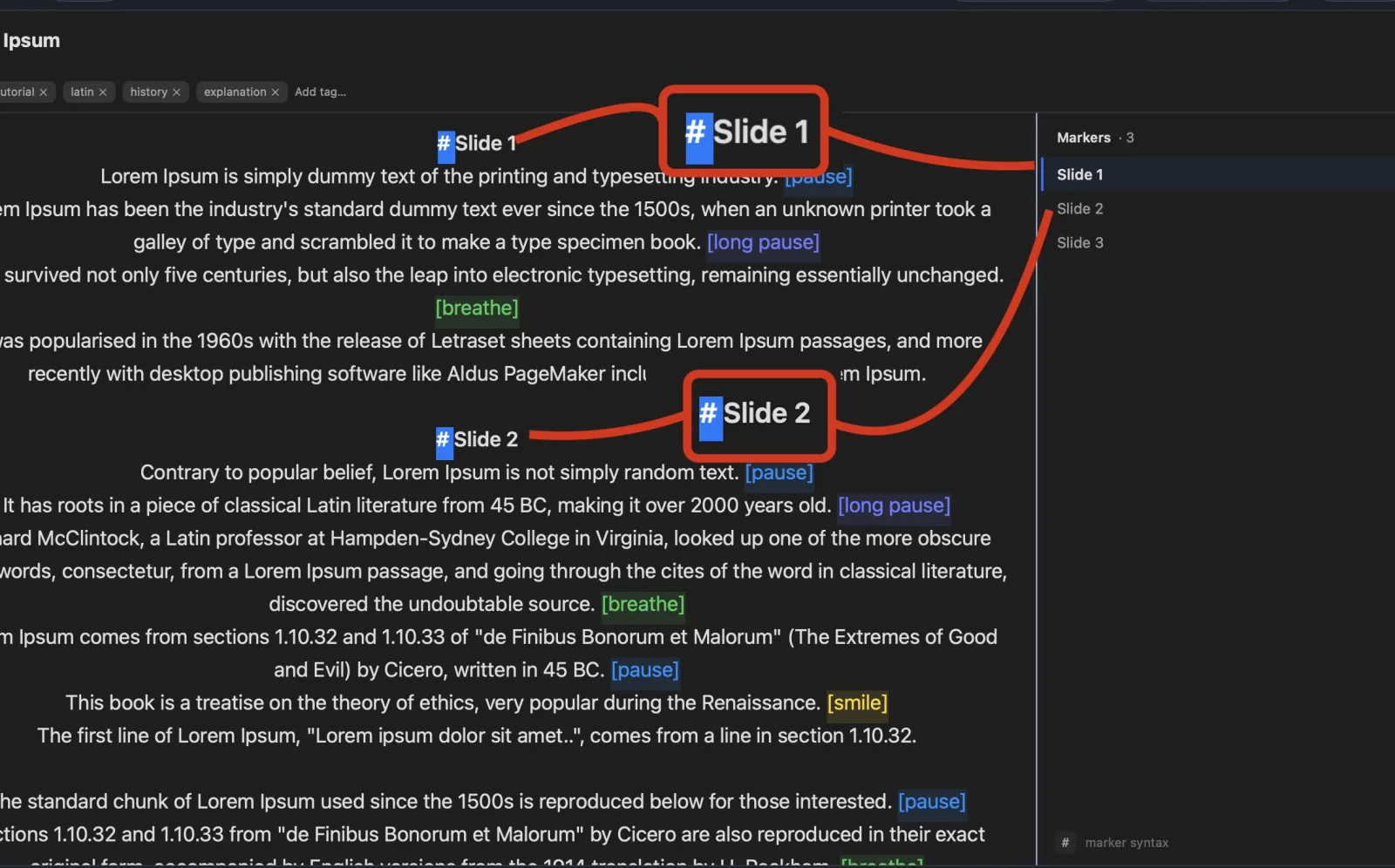
Jump instantly to key sections in your script without ever scrolling manually. Avocado supports fully automated markers using any customizable syntax.
Start any line with your marker, and it dynamically becomes a visual Marker.
Toggle the sidebar to see all your active markers and jump between them instantly.
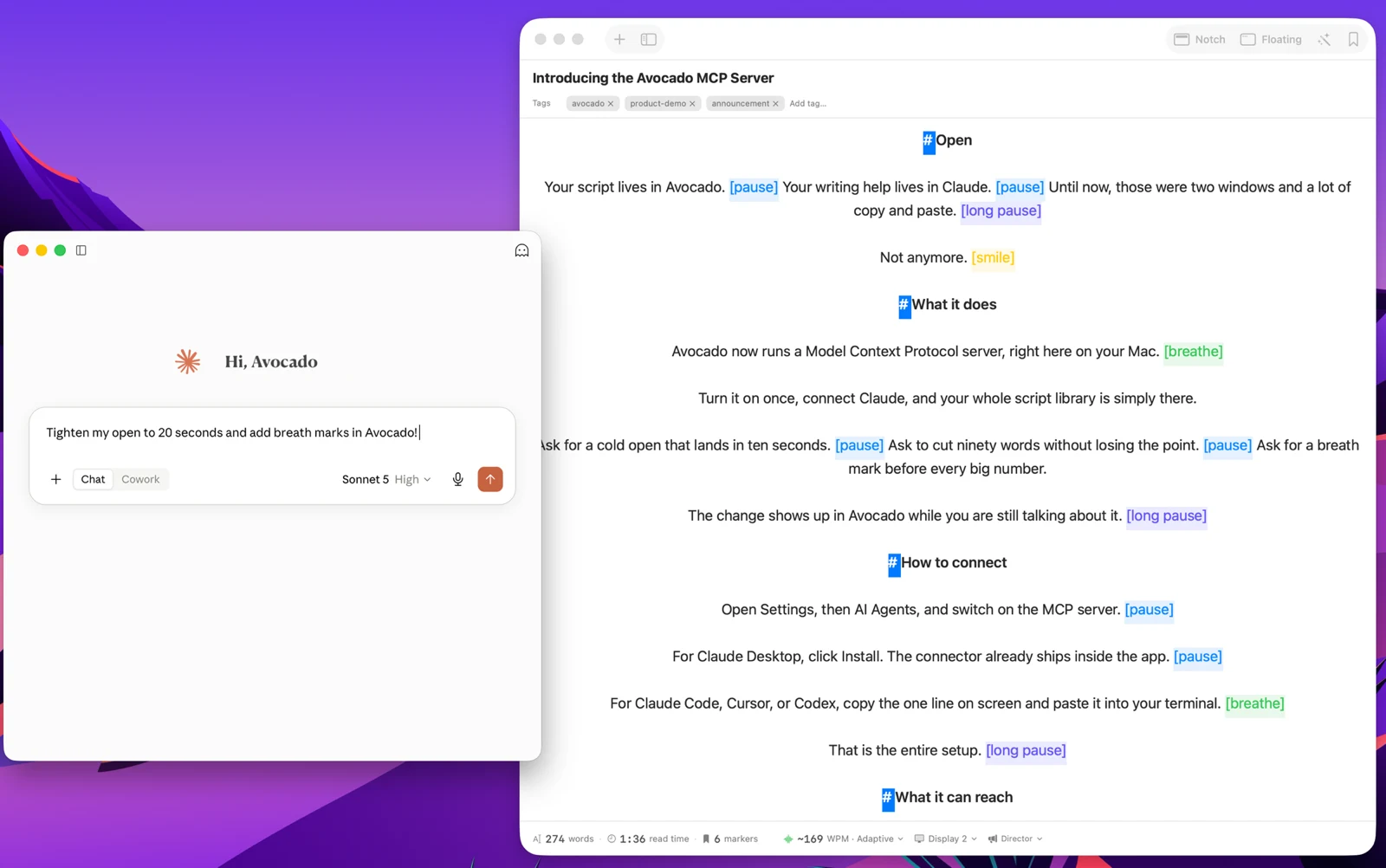
Using on-device Apple Intelligence, Smart Cues automatically analyzes your script and invisibly sprinkles pauses, breaths, and smiles to give you the perfect pacing naturally.
Processes locally on your Mac's Neural Engine. 100% private.Requires macOS 15.1+ & Apple Silicon
Reminds you exactly when to breathe or pause for dramatic effect.
Level up your virtual meetings, webcasts, and tutorials with an invisible, voice-tracking prompter.
Essential features to get you started.
No credit card required.
All Avocado features included.
One-time payment. Yours forever.
Avocado is the only prompter that auto-scrolls to match your exact Words Per Minute. Take our free 30-second test to find your natural speaking rhythm and discover your presenter archetype.
Everything you need to know about Avocado.
No. Avocado is completely invisible to your audience during screen shares. Whether you're presenting on Zoom, Google Meet, Microsoft Teams, or recording via Loom, your teleprompter stays entirely hidden from viewers.
Yes! Avocado uses on-device voice recognition to automatically scroll the script precisely as you speak. It dynamically learns your preferred reading speed and intelligently pauses whenever you stop to take a breath or answer a question. Voice-activated scrolling is free for scripts up to 200 words. Avocado Pro removes that limit entirely.
Absolutely. While it's designed to seamlessly blend into the MacBook notch for perfect eye contact, Avocado features a drag-and-drop 'Floating Mode' that lets you pin the prompter anywhere. It's perfect for external monitors, studio displays, or older Macs.
No subscriptions here. Avocado Pro is a flat, one-time payment of $19.99 — a lifetime license. You get unlimited voice-activated scrolling, adaptive speed, mouse scroll, AI Smart Cues, Follow Mouse, Director Mode, and all future updates. Pay once, yours forever.
The Free version is yours forever, with zero credit cards required. It includes both Notch and Floating modes, Script Markers, complete aesthetic customization (sizes and colors), and remains 100% invisible on your screen shares. Voice-activated and adaptive scrolling are also included free for scripts up to 200 words — perfect for trying the full experience before upgrading.
Avocado is built on modern Apple frameworks to ensure optimal performance and minimal battery drain. Because of this, the core app requires macOS 14.0 (Sonoma) or newer. Note that the Smart Cues feature utilizes Apple Intelligence, which specifically requires macOS 15.1+ on a Mac with Apple Silicon (M1 or later).
Yes. You have full control over the prompter's readability. You can easily adjust the text size, text formatting, text color, background color, and alignment (left, center, right, or justify) to suit your exact lighting environment and vision preferences.
Still have questions?
Browse every feature — what it does, whether it's free, and why it matters.